
01 / The concept
OpSec is a chain, not a setting
Operational security guides compiled by Dread and Pitch community members make this point repeatedly: each tool in the stack answers a specific threat, and only that threat. Tor Browser handles how traffic reaches the network. It says nothing about what survives on the device afterward — the operating system determines that, and it's a completely separate question.
The chain: browser and phone first, then the device and OS, then what gets stored and how, then whether the site at the other end is what it claims to be. Work through them in order.
 Tor Browser Safest level
 Tails OS Amnesic USB
 Whonix Gateway + WS
 Qubes OS VM isolation
 GnuPG / Kleopatra OpenPGP
02 / The connection layer
Step 1 — Configure Tor Browser before you do anything else
Tor Browser routes traffic through three relays — no single relay sees both the origin and the destination. But the default configuration is not the safe one. Dread community operational security instructions are clear: defaults balance privacy against usability for a general audience. For a darknet market, usability is not the priority.
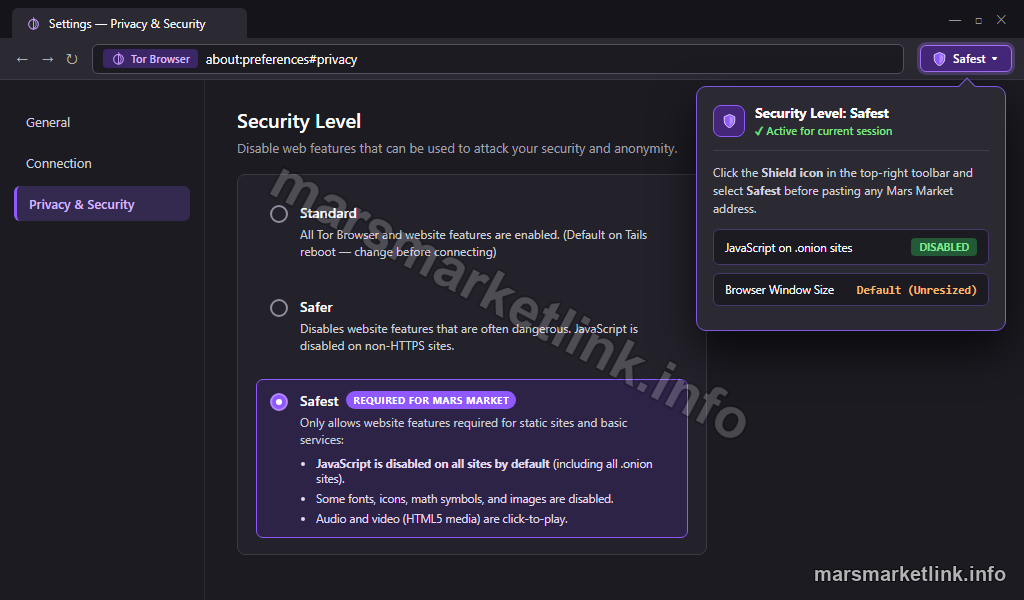
Set the security level to Safest
The security slider controls how much of the web the browser will execute. Setting it to Safest disables JavaScript on all sites by default — the most common vector for browser-based de-anonymization. The exact sequence for loading a Mars Market address after configuration is in the access guide Tor Browser section.
- Open Tor Browser and click the shield icon in the toolbar.
- Select Change Security Settings.
- Drag the slider all the way to Safest.
A second layer is worth adding. Open a new tab, type about:config, accept the warning, search for javascript.enabled and set it to false. This kills JavaScript at the engine level — if NoScript ever fails, the backstop holds. While there, set privacy.resistFingerprinting.spoofOsInUserAgentHeader to true. Rare operating systems stand out in fingerprinting datasets; reporting Windows 10 instead makes the profile less useful to anyone collecting it.
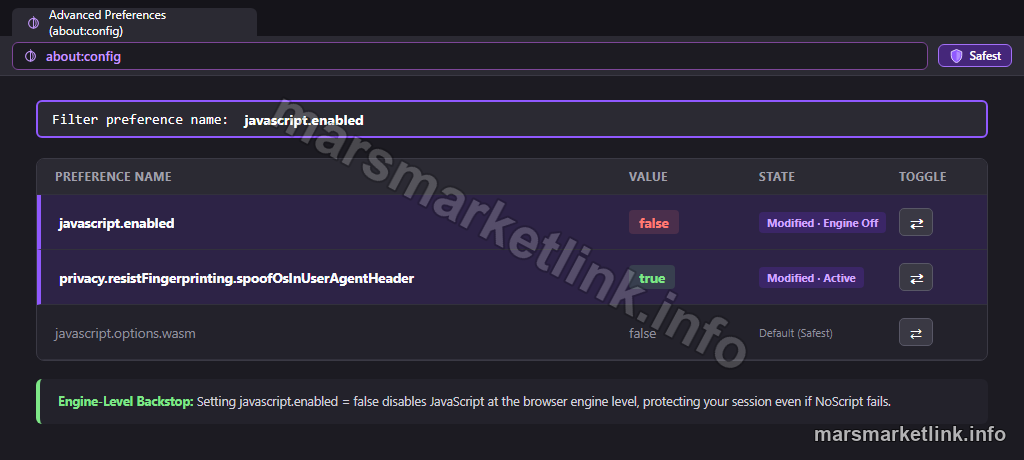
about:config): Set javascript.enabled to false and enable OS user-agent spoofing.
about:config
Never expand Tor Browser to full screen. A maximised window reveals the display resolution, which narrows the anonymity set fast. Window size is the easiest fingerprinting signal to avoid — so avoid it.
Your phone is a separate risk surface
The browser runs on a device that usually has a phone nearby, and in most setups they share a network, a cloud account, or both. Pitch forum operational security guides flag this consistently: notifications, installed apps, and location services create metadata trails with no relation to the Tor connection. Keep updates current on both. Lock the screen. Check which apps have background access.
03 / The device layer
Step 2 — Choose your device and operating system deliberately
The browser works on top of an operating system. That OS decides what survives the session — what files, what logs, what traces remain after the window is closed.
The DNM bible — a community-authored guide widely referenced across darknet market forums — is direct on this: do not use Windows or Mac for sensitive sessions. They remember everything by default, and hardening them correctly is a project in itself.
Tails, Whonix, and Qubes: different tools for different risk levels
Three alternatives come up in every serious operational security discussion:
| OS | How it works | Best for |
|---|---|---|
| Tails | Boots from USB, routes all traffic through Tor, forgets everything on shutdown — including the fact it was booted at all | Beginners; runs on almost any PC, no installation required |
| Whonix | Two virtual machines: a gateway that only speaks Tor, and a workstation that can't reach the internet directly | Intermediate users comfortable with VirtualBox |
| Qubes + Whonix | Full compartmentalisation — each task runs in a separate isolated VM on a hardened host | Advanced users; misconfiguration is a real risk here |
For most people, Tails is the right starting point. Nothing persists unless explicitly enabled, persistence is encrypted, and the system leaves no trace on the host machine. Always run the latest version — updates patch real exploits, and falling behind defeats the exercise.
None of these options guarantee anonymity. They reduce exposure, compartmentalise risk, and make forensic reconstruction harder. The OS decides what survives the session. What gets stored and how is the next question.
04 / The storage layer
Step 3 — Store less, and protect what you keep
Three distinct things get confused here more than anywhere else, and confusing them creates single points of failure.
PGP key, account passphrase, mnemonic seed: three different things
A PGP keypair has two halves. The public key gets shared — upload it to the market profile, give it to vendors for encrypting messages, let the platform use it for 2FA challenges. The private key stays on the machine, protected by its own passphrase, stored in the GnuPG keyring. Lose it and 2FA access is gone; recovery falls back to the mnemonic seed.
The mnemonic seed is a separate mechanism. It's the sequence of words generated at registration: it restores the account, not the authentication layer. They solve different problems. Store them separately. Both in the same location means one compromise undoes two protections at once. For the platform mechanics around seed phrase generation and account recovery, see the vendor tier and platform rules overview.
Minimise what persists between sessions
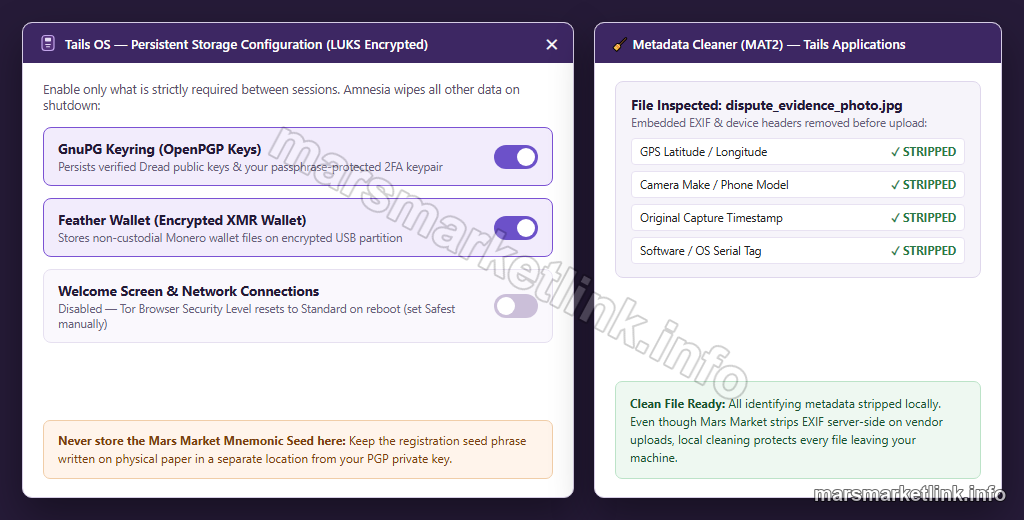
The less that survives a session, the less there is to recover. On Tails, persistent storage is opt-in: enable the GnuPG keyring and what's genuinely needed, leave the rest off. Any file leaving the machine should be checked for embedded metadata. Photos carry EXIF data — GPS coordinates, device model, timestamp. Metadata Cleaner is in the Tails applications menu. Mars Market strips EXIF from vendor photos server-side, but that covers the upload direction only.
05 / The verification layer
Step 4 — Spot phishing clones before you log in
A convincing phishing clone doesn't look suspicious. It reproduces the layout exactly, publishes a PGP key, and often displays a signed announcement. The signature checks out. The fingerprint matches what's printed on the page. None of that tells you whether the key belongs to Mars Market — because the clone controls both the key and the message it signed.
What "good signature" actually proves
PGP verification confirms that a message was signed by whoever controls a specific private key — not that the key belongs to Mars Market. A clone generates its own keypair, signs its own announcements, publishes its own fingerprint, and clears every automated check.
The only thing that breaks this is independent key verification: establishing ownership through a source with no connection to the site being evaluated. A Mars Market PGP fingerprint from a Dread post predating any clone, cross-referenced against a community archive, is evidence. A fingerprint published only on the site asking for trust is not. The full procedure — fingerprint retrieval from Dread, GnuPG command-line and Kleopatra methods, character-by-character address comparison — is in the Mars Market PGP verification guide.
Compare the address character by character
Onion addresses are 56 characters of base32. Clones change one or two of them, usually in the middle section where attention drops. Anti-phishing instructions compiled by Dread community members are direct on this: never follow darknet market links from DMs, Telegram screenshots, or search results. Those three channels are the most reliable delivery mechanisms for phishing addresses. The safe source is one verified independently through the same PGP process above.
Two-factor authentication adds a login barrier but does not verify the site is real. A clone with a working login form passes that test the moment credentials are entered. Verification has to happen before the login attempt, not during it.
06 / The model
What each layer actually proves
The Mars Market security stack makes more sense when each tool is described by what it demonstrates rather than what people assume it covers:
| Layer | What it proves | What it does not prove |
|---|---|---|
| Tor Browser (Safest) | Connection properties; browser environment isolation | Honesty of the destination site |
| Tails / isolated OS | Session amnesia; data compartmentalisation | Complete anonymity — only reduced exposure |
| PGP encryption | Confidentiality of the message content | Authenticity of the source |
| PGP signature | Message was created by whoever controls this private key | That this key belongs to Mars Market |
| PGP + independent verification | Message origin — if the key ownership was established externally | Nothing beyond what independent verification already confirmed |
| 2FA | Additional login barrier; possession of the private key | Authenticity of the site asking for it |
Browser and phone, then device and OS, then storage and key management, then independent verification of what's on the other end. Each step answers a question the others can't. That's the Mars Market security model — and the darknet market opsec model more generally.
What comes next
Continue: verify the link, then access Mars Market safely
The operational security covered here builds the environment. The next material is specific: how to evaluate a Mars Market link, verify a signed mirror announcement, and complete login without handing credentials to a clone.
The PGP link verification guide ↗ covers fingerprint retrieval, signature verification, and character-by-character address comparison step by step. For the full access sequence — anti-phishing screen, Verify Mirror button, registration — the access guide ↗ picks up from there. For the financial layer — what escrow actually protects against, what it doesn't, and how the walletless payment system works — the payments and escrow guide ↗ continues from here.